

Agar SMA ko current account open karte time CDD (Customer Due Diligence) ka error aa raha hai to SMA axis current account open nahi kar sakta
Axis Bank – Current Account FAQ’s
Axis Bank Current Account FAQ’s :-
1:- What does it means “Axis BC Agent” ?
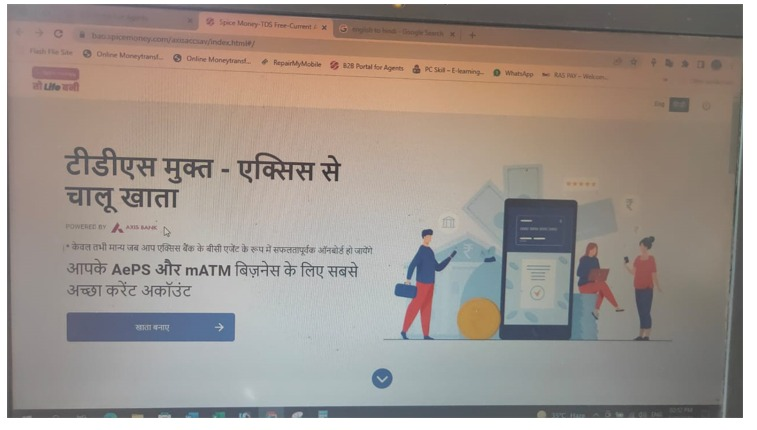
If SMA is opening the Axis TDS free current account, then Axis bank will onboard our SMA as a Axis BC agent.
Q 1:- What is Axis Digi Current Account?
- Axis Digi Current Account is a new age digital Current account offered by
Spice Money for Individual Spice Money Adhikari. - You can open a Digi Current Account by visiting www.axisbank.com. All you need is your
Aadhaar, PAN & other basic details. - Since this process is completed through a Video verification, kindly ensure you are using a camera enabled
device.
Q 2:- Benefits of Digi Current Account ?
- Below are the features of Digi Current Account.
- Digital Full KYC account with zero monthly service charge
- No need to visit the Branch -Avail all in Spice Money Portal & APP
- On account activation start transacting securely via Debit card, UPI, NEFT, IMPS and RTGS.
- E- Debit Card loaded with offers – Get your virtual Debit card instantly on account opening
- Business Classic Debit Card loaded with benefits- Dispatched to your communication address after
- account opening
- Signature Update via Axis Mobile app – Update any time after account opening
- TDS Free Account
Q 3:- Eligibility to open Digi Current Account ?
- You can open an Axis Digi Current Account as long as
- You are an Indian citizen
- You are opening an account with Axis Bank for the first time
- You have a valid PAN and Aadhaar number
- You have a valid mobile number linked to your Aadhaar
- You are 18 years of age or above
- Your Desktop/Laptop or Mobile Device with which you are
- opening an account has a camera for the Video KYC process.
- You are applying from India
Q 4:- Is it mandatory to share Aadhaar details to open a Digi Current Account ?
- You need to voluntarily share your Aadhaar details to open a Digi Current Account.
- In case you do not wish to share your Aadhaar or VID details, you can visit your nearest Axis Bank and choose and open a Current
account from our wide range of products.
Q 5 :- Requirement to open Axis Bank current Account ?
- You need to have the following details to open an Axis Digi Current Account
- Valid Aadhaar Card & PAN Card
- Valid mobile number linked to Aadhaar Card
- Your name on the Aadhaar Card & PAN Card should match
- You must be a new to bank customer
- Make sure these requirements are met
Q 6 :- Do I need to visit a branch after opening Digi Current Account ?
You need not to visit a branch post account opening. Your just have to login Spice Money APP and B2B portal
click on “Account Opening Tile”
Q 7 :- Cash deposit allowed for Digi Current Account ?
You can make a cash deposit upto Rs 1 lakh per month in your Digi Current Account.
Q 8 :- Do I need to add a nominee for my Digi Current Account ?
- It is always good to have a nominee for your account.
- In case of unforeseen circumstances the funds can be transferred to the nominee without any hassle.
- You can, however, skip nominee details while opening the account and add one later.
Q 9 :- Initial funding needed to open the account ?
- 590 Rs Initial amount Adhikari has to pay while opening the account.
- That amount will be refunded back to the newly created account.
Q 10 :- Initial funding needed to open the account ?
- 590 Rs Initial amount Adhikari has to pay while opening the account. That amount will be refunded back to
the newly created account.
Q 11 :- If I already have Saving Account in Axis bank can I still open this
current account ?
Ans :- Yes you can
Q 12 :- Can I open multiple current account ?
No you cannot open multiple current account
Q 13:-What is the minimum amount you are required to maintain in your
Current Account every month?
Ans:-There is no minimum amount you are required to maintain
Q 14:-What will happen if got disconnected while fifilling all details.
Do I have to all details again?
No Don’t Worry you don’t have fifill your details again you just have to login again by Pan ,Aadhaar,OTP you
will be redircted to the same place where you have left last time while fifilling the details.
Q 15:-What is the maximum time within which I have to
complete my application?
You need to complete all 4 steps of your application within 3 days (72 hours) from the
time you completed your Aadhaar based OTP verifification in Step 1.
Will my account be activated immediately after I complete all 4 steps
of the application?
- Post successful completion of Video KYC, your application will be processed, during which a backend
verifification is done. - Duration of this verifification process may vary from 1 hour to a few days, depending on
various factors. - In the unlikely event where you have not received an email confifirmation from us regarding account
activation even after 4 business days, please reach out to us here to check the status of your account
Q 16:-How do I resume my application if I was not
able to complete it the first time.
As soon as you complete Step 1, a link is sent on your registered
mobile number.
Click on this link to resume your account opening journey.
Please note that the link will be valid only for 3 days (72 hours).
Post this time frame, you may start the journey again as a
fresh application.
Q 17:-Can I provide an address that’s different from my Aadhaar address
for communication purposes?
Yes, at the time of applying for a Digi Current Account, you can provide your communication address with a
self declaration.
Q 18:-I completed funding for my account but I am unable to complete
my application.
If you’ve completed funding but not completed your Video KYC within 3 days (72 hours) from the time you
completed your Aadhaar based OTP verification in Step 1, your funding amount will be refunded to the
originator bank. You should receive your refund within 3-7 working days, depending on the bank.
Q 19:-While funding the account, my account got debited. However,
it says that the payment failed.
Q 19:-While funding the account, my account got debited. However,
it says that the payment failed.
This happens when we do not receive a confirmation of the payment from the payment gateway. In such a
scenario, the amount will be refunded to your account within 3-7 working days. You may initiate a fresh
transaction to complete the account opening journey.
Q 20:-How do I begin using Internet Banking for Digi Current Account?
You can register for Axis Mobile using your registered mobile number. You will need to authenticate yourself
using either of your Debit Card details before initiating any financial transactions.
Q 21:-How do I update details in my Digi Current Account?
You can update the information through Mobile Application, Internet Banking or by visiting the nearest
branch.
Q 22:-Which debit cards will I get with my Axis Digital Current Account?
- A Visa E-Debit Card (which is a virtual Debit Card) instantly on account
opening. - This will be shared on your registered email ID. You may start transacting with
this card immediately, post account activation. - A Business Classic Debit Card. This will be dispatched to your
communication address post account activation application.
Q 23:-What is a virtual debit card?
- It is a digital debit card that provides easy, secure online transactions and does not have any plastic existence.
- It can be used to register for Axis Mobile App.
- It ensures that all your important details such as your 16 digit card number, expiry date and CVV are all visible online.
- You receive a virtual debit card immediately after opening an Axis Digi Current Account.
Q 24:-Where do I find the details of virtual Debit Card linked to my Digi
Current Account ?
In case you have not written down your Virtual Card details, you can fifind the details in Axis Mobile App.
Please follow the below steps:Login to Axis Mobile App >> Accounts >> Click on Your Digi Current Account
No. >> View Debit Card Details
Or you can search the welcome email in your email box which contains the Virtual Card
details.application.
- Q 25 :-How do I generate a Debit Card PIN?
- Internet Banking : Select the Debit Card through My Debit Cards under Accounts option >> Click on
Set Debit Card PIN from drop down under More Services & enter New PIN & Expiry Date >> Enter
NetSecure code received through SMS - Axis Mobile app : Click on Debit Cards through Services under Banking option from the Menu >>
Click on Set / Reset PIN & Select your Debit Card >> Enter New PIN & Enter MPIN to process your
request - Phone : Call Axis Bank Phone Banking at 1860-419-5555/ 1860-500-5555 from your mobile number
registered with the Bank. >> Select Debit Card PIN Generation >> Validate Debit Card Number, Expiry
Date, and Account Number >> Select PIN Generation >> Enter Activation Code >> Set Debit Card
PIN. - Please Note: Activation code is sent on your email ID / Mobile phone during this process and is
valid for 30 minutes - ATM : Insert Debit Card at ATM >> Select PIN Change Option >> Enter Mobile No. >> Enter Pass Code
>> Enter New PIN.Please Note : You cannot generate PIN for your virtual card using the ATM
Q26:-Daily transaction limits for my Virtual Debit Card?
The Virtual Debit Card will have an e-commerce transaction limit of Rs. 1,00,000/- per day. You can modify
this limit by logging in to Internet Banking or through Axis Mobile app
Q27:-How is a Virtual Debit Card different from a physical Debit Card?
- You may use your Visa E-Debit Card (virtual) only for online transactions like shopping, travel, recharge,
transferring funds etc. - You may also use it to withdraw cash at ATMs that have cardless withdrawal facility.
- You may use Business Classic Debit card (physical) for online transactions, offlfline transactions at merchant
POS and cash withdrawals at any ATM.
Q28:-What is the validity of Virtual Debit Card?
Your Virtual Debit Card is valid until the expiry date mentioned on it.
Q29:-How do I generate a Debit Card PIN for virtual Debit Card if I did not
generate it during the application process?
- The process applicable for both the E-Debit card and Business Classic Card, is via Phone Banking.
- Alternatively, you may set the PIN for your Business Classic Card via any of the other options
Q 30:-How do I place a request for replacement/Upgrade Debit Card?
- You may apply for a replacement or upgrade of your Business Classic Debit Card via the below steps.
- Axis Mobile App : Click on Banking >> Services >> Debit Cards >> Upgrade >> Select the Card
Internet Banking : - Select your Debit Card through My Debit Cards under the Accounts option >> Select
between Block / Replace / Upgrade & the card you wish to upgrade to >> Enter code received through
SMS - Branch : You can visit your nearest Axis Bank branch & place a request to get a physical Debit Card for
your Current Account.
Q 31:-Benefifits of for Digi Current Account?
The Business Classic physical debit card comes with a host
of benefifits like
Higher transaction limits
Insurance cover of upto Rs 2 Lakhs
Personalisation of the debit card
Dining delight at partner restaurants
Q 32:-Delivery of physical Debit Card?
- The Business Classic Debit Card will be delivered to your communication address within 7 working days from
the time of account activation. - If you have not received it please reach out to us here for resolution. However,
with the special circumstances that we are currently facing nationwide, some delay in delivery may be
expected.
Q 33:-I wish to use both Virtual as well as Physical Debit Card?
Yes you can use both the cards.
Q 34:-Charges for Virtual Debit Card for my Axis Digital Current Account?
As a Digi Current Account holder, you will get a virtual debit card with an issuance fee of Rs.500.
Q 35:-Benefifits of a Virtual Debit Card for
Digi Current Account?
The virtual debit card comes with a host of benefifits like
1 BOGO every month on Bookmyshow (capped at Rs 200)
1 % cashback on online spends, minimum transaction size- Rs.500
Q 36 :- When customer ( SMA ) is getting this error ?
Could be either of 3 reasons ;-
1. Negative Pincode
2. Negative List (Hunter + RAMP )
3. Existing to Bank
Q :- 37 Axis Bank account rejectected ?
Axis Bank account rejection Reason Are following :-
1. While selecting Occupation, do not select ‘Others’ or mention Private Jobs. For Business Correspondent activities need to select Business Activities
2. Always show/share Original Documents at the point of completing your Video KYC
Q :- 38 SMA opend a axis bank current account and he already pay 590RS but still account not activated ?
Resolution :-
Maafi Chahuga ashuvidha ke liye Nischint rahiye aapki puri sahayata ki jayegi,Meain aapko btana chahuga iske liye aapko axis bank meain baat karni hogi wo aapki iss se related help karege.
Q 39 :- SMA Disputing that axis Bank taking Maintainance charges of TDS free current account. ?
Resolution :-
Maafi chahuga ashividha ke liye meain aapko btana chahuga agar aapne axis bank current account spice ke portal se open kia hai to usme aapko khoi v balance maintaine
karne ki jarurat nhi hai ager aapka maintainance ka charge deduct huaa hai to aapse nivedan hai axis bank meain iss se related baat kijiye.
Q 40 :- In which Address SMA will recive his Debit card and cheque book of axis bank current account ?
Resolution :-
Adhikari ji cheque book orr debit card aapko aapke register address pe hi aayega jo aapke address proof me mentioned hai.
Q 41 :- When debit card 590rs charge will debited from my account?
Ans:- If SMA opened an account between 1st April to 30 April so 590 + extra Transection charges will be debited from his account on 1st Saturday of next month.
Q 42 :- How Much ATM Transection I can do In a Month?
Ans :- Five Transection are free in a month from Axis ATM.If SMA will exceed the limit then from 6th transection onwards (**+ Gst charge) will be levied. (Charges need to confirm)
Q 43 :- What could be the reason for the Rejection?
Ans:-. Enter Wrong occupation details
2.not showing original document.
3. Hunter
Q 44 :- Why the AMB charges being debited from my account ?
Ans:- If you open this account apart from spice money like directly from axis website or bank so you need to maintain amount on you account if you not maintain the amount then charges will be levied, if SMA disputing that he open this account from spice money then will inform that we are forwarding your case to the concern department.
Q 45 :- Why My account showing in negative balance?
Ans:- Dear sir you need to pay 590 RS for debit card which is supposed to be debit on 1st Saturday that time sufficient balance was not available on your account that’s why it is showing negative kindly credit required amount in your account then your account Balance will be appear in positive.
Q 46 :- Why are the MAB (Monthly Account Balance) charges being debited from my account?
Ans:- Zero MAB is being offered to SPICEMONEY Accounts only, and applicable if SPICEMONEY label is affixed to the Account, which system automatically captures if the account is being opened through the correct UTM link shared with SpiceMoney, MAB will be charged if account has been opened through a different link.
Q 47 :- What is Consolidated Charges?
Ans:- Various applicable charges are levied by the Bank depending on the type of Current Account you hold with the Bank or on account of any additional service /product you have opted from the Bank. These charges are consolidated and levied at the end of the month to your Current Account under the header ‘Consolidated Charges’.
Q 48 :- When will be debit card charges will be deducted from the account post account opening ?
Ans:- Debit card charges will be deducted Post the Account Opening, Once the system runs the debit card charges.
Q 49 :-How many ATM Transactions can we done in a month?
Ans:- 5 Transactions from Axis Bank ATM and 5 Transactions from Non-Axis Bank ATM is free, Beyond that it will be charged 20 + GST for Financial Transactions and 8.5 + GST for Non-Financial transactions at other Bank ATMs.
Q 50 :- Why My account showing in negative balance?
Ans: If the Bank levy any charges to the Account, And there is no sufficient balance in the Account to recover the charges, a Lien is marked to the Account, which will appear as Negative Balance equivalent to shortfall of the fund.
Q51:- Adhikari is getting message to maintain minimum balance amount in his Axis Current bank account (Opened from Spicemoney) ?
Ans: Will inform Adhikari that his Axis bank current account is zero balance account further Adhikari can call on “1860 419 5555” or he can connect with his branch
Process of unfreeze Axis bank TDS Free Current account
Few spice money accounts which were not correctly verified during t+7 calling and branch had later applied freeze onto those accounts.
Request you to communicate the following as guidelines which will ensure the Adhikari is correctly verifying their accounts:
- Phone no should be as per the application.
- Income details(amount ) should be as per details filled in profile section of on boarding.
- Occupation type and source of fund as per application
- Deliverables status.
Process of unfreeze:- All those accounts where Adhikari is reporting that freeze has been applied , they need to visit the mapped branch , confirm their details and get same verified and have freeze removed. Central office cannot remove the freeze without verification.