

Both current and savings accounts can only be opened through the Spice Money application only.
Adhikari Current and Saving account dono NSDL CASA ki tile per click kar k open kar sakte hai.
NSDL CASA – FAQ’s
NSDL Account error’s with solution + Tagging
|
SNo. |
Product Errors (Account opening errors) |
Proposed Solutions |
TAT |
|
1 |
This service has been stopped for you this time. Please connect customer care for the support |
SMA can use the registered SIM in any mobile device but he has to reinstall the Spice Money app and must allow the OTP to be auto-fetched in that device. |
Realtime |
|
2 |
Your Aadhar Seeding Status : Rejected/Failed |
Either fresh seeding/ remaping option wrongly chosen or Existing Bank input is wrong |
Realtime |
|
3 |
Aadhaar Seeding Status : Mapped to Some Other Bank and OD already exists |
Either not filling the required details or filling it wrong, so please input the correct details |
Realtime |
|
4 |
Aadhaar Seeding Status : Previous Bank INN is Mandatory in case of Re-seeding the aadhaar |
Realtime |
|
|
5 |
You have an application exist with debit card |
Account opening journey started with Rs 449 Option with debit card. Either complete journey with debit card using 449 option or retry after 3 days |
As per option |
|
6 |
Technical Issue in HSM |
Update the Biometric RD mantra app or change it |
Realtime |
|
7 |
invalid “dc” code under Meta tag(521) |
update the RD Mantra app and re try |
|
|
8 |
KIndly enter VPA of an account |
Close the app and reopen the app it will wok |
Realtime |
|
9 |
Do not honour – PINCODE |
Negative Pincode Issue, Account cannot be opened |
Cannot Be Opened |
|
10 |
Do not honour – Mobile |
Mobile number is blocked, try with a different number |
Realtime |
|
11 |
Do not honour – CDD |
Customer failed in Customer due diligence (CDD) by bank, Account cannot be opened |
Cannot Be Opened |
|
12 |
Error downloading MLKit module dependency |
This is a device error please go to the phone setting under the application list search Google Play Store and Google Play Services clear their cache and then restart the phone and try |
Realtime |
|
13 |
Name in Aadhaar does not match with Name in Pan,Kindly Contact NSDL Payments Bank for more details |
If this comes while opening Savings Account tell them to either open the account with the Form 60 or to change the names over the documets |
|
|
14 |
Agents who are facing amount mismatch while making payment(from 118 to 449) |
Please ask them not to click on the tile multiple times while the service is loading. Once you click on the Open Account tile, wait for a while and select the correct option when the option opens. Agents please follow the steps below: |
Realtime |
|
15 |
|
||
|
16 |
SECURITY THREATS ALERT error over screen |
Ask customer to disable Debugging Mode which would be under Developer Options in Settings |
|
|
17 |
If an account does not opened and is in Pending status |
Please retry after 3 days |
3 days |
|
18 |
esign has been completed for this account. Account will be created in 3 days |
||
|
19 |
Dear user, your account creation is in process. It may take 3-7 days for account creation. Please try linking after that |
||
|
20 |
Customer eKYC completed with Bank through other partner. We cannot process request for account opening. Please try again after 3 days |
||
|
21 |
Dear Customer, Application for this mobile number exist with another agent |
Retry try after 3 days or complete the journey with the same agent he started initially |
3 days |
|
22 |
Checksum is invalid |
Becuase account either not opened or in pending status so retry after 3 days |
|
|
23 |
Techincal Difficulty, Please Contact Support Team |
Please retry after 72 hours |
72 hours |
|
24 |
Issues over insta kit linking pages |
Email the issue with screenshots at ravi.bharti@spicemoney.com |
|
|
SNo. |
Product Errors (Account opening errors) |
Proposed Solutions |
TAT |
|
25 |
Dear Agent, Please open NSDL Current Account using NSDL app to avail CASA services |
SMA ko apne respective sales person/DL-BL/CH se latest error screenshot ke saath contact karna hoga. Backed Process :- Respective Sales team usko NSDL group/Ravi Bhart ko share karega or resoltuon karayega. |
Realtime |
|
26 |
PAN is already mapped to an existing customer |
||
|
SNo. |
Post Account opening errors |
Proposed Solutions |
TAT |
|
1 |
IVR Issues |
The customer can raise the NSDL issues by the following methods |
As per NSDL CARE Timeline |
|
2 |
PIN generation issues |
||
|
3 |
Virtual Card Block |
Customer has to email the issue from his registered email ID to block the virtual card at care@nsdlbank.co.in Following are the use cases of the above solution Note🚨 – Virtual card is only available under the Rs 100 account. Go to the card section under the NSDL Jiffy app to activate it. |
1 Day |
|
4 |
Account Limit Issue (Monthly limit of Rs 2,25,000) |
Check Account Status (Active/ Block) and transactional history over the NSDL Jiffy App If status is Active and limit are crossed then try next month |
As per the issue |
|
5 |
Account Blocked/Freeze Issue |
Check the Account Status over the NSDL Jiffy app whether it is Active or Block/ Freeze NSDL ka account freeze/Block ho gya hai to customer ko apni registered email id se apne sabhi documents ke saath Email:- spiceaccount@nsdlbank.co.in par email karna hoga NOTE – After email received SMA ko apne sales person se contact karna haoga Link :- https://docs.google.com/forms/d/e/1FAIpQLSeSb_Ibdkxwc-g3A48omyZ05zJhXKZvUELTeeWZ0E7SMDRJNQ/viewform |
As per NSDL Account Blocked Tracker Sheet Timeline |
1. NSDL CASA Service kya hai ?
Ans :- Priye Adhikari ji, aapko batana chahenge ki yah ek service hai.. jiske through aap apne customers ke liye Saving account open kar sakte hai… aur apne customer ko kit bhi provide kara sakte hai |
2. NSDL CASA ki Kit me kya hota hai ?
Ans :- Priye Adhikari ji, aapko batana chahenge ki kit me aapko ek debit card milta hai… Jisko customer ka account open karte time apko kit ke number ke jariye debit card customer ke account se activate karna hota hai
3. Agar SMA ke paas NSDL CASA account ki tile show nhi ho rahi hai ?
Ans :- SMA ko NSDL Casa ka service pack ko purchase karna hoga.
4. NSDL CASA service ka charge kitna hai ?
Ans :- Service Charge Amount :- Rs. 999
Script :- Priye Adhikari ji, Aapko batana chahenge NSDL CASA service ka charge Rs.999 hai
Note :- Adhikari jab customer ka account open karne ke saath saath kit bhi activate karta hai…. Jab custome ka account activate ho jayega to SMA ko “Per Kit ka amount Rs. 75 or usi ke saath commission bhi mil jayega… jo ki Kit ka refund SMA ko Kit activate hone ke 10 days me milega
5. NSDL casa service pack ka amount refund kab hota hai ?
Ans :- 15 Working days
7. NSDL CASA Service abhi kitne SMA ko di gayi hai ?
Ans :- 100 % Base par live hai leking SM Ako service pach purchase karna higa
8. SMA ko service pack kharidne ke baad Kit kaise milengi ?
Ans :- Service pack ko purchase karne ke baad SMA ko kit ke liye apne distrubutor/Partner se contact karna hoga |
9. Accout activate hone ke baad SMA ko “Commission” kab milegi ?
Ans :- Priye Adhikari ji, aapko batana chahenge ki customer ka account open hone ke baad… Jis Month me aapne customer ka account open kara hai uske next month ke 15 tareek se pahle aapki saari commission ek saath aapke wallet me credit ho jayegi
10. SMA ko Kit kaise milengi ?
Ans :- SMA ko kit’s lene ke liye apne distributor/ Partner se contact karna hai.
11. SMA ko kit milne ka process kya hai ?
Ans :- SMA ko apne distributor/Partner se contact karna hoga partner apne inventory module se KIT ka order karega…….. Kit Distributor/Partner ke paas aa jaane ke baad wo usko SMA ke deliver karenge.
12. Partner/Distributor Kit o ko kaise order kar sakte hai ?
Ans :- Order Process
1. Partner/Distributor inventory module ke through Kit ka order kar sakte hai.
2. Partner/Distributor inventory module ke through 50 Kit’s ke multiple me hi kit’s ka order kar sakte hai.
3. Kit Partner/Distribuor ke paas T+7 days me deliver ho jayengi.
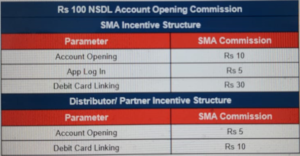
18. SMA Commission plan ?
Ans :-
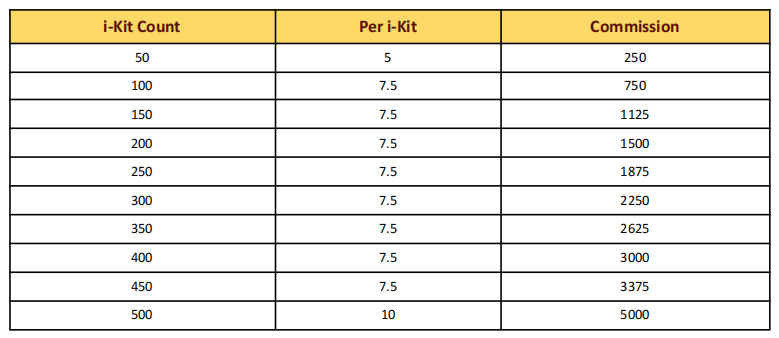
19. Distributor/Partner Commission Plan for Kit Purchase ?
Ans :-
20. Distributor/Partner Commission Plan for Account Opening ?
Ans :-

21. Account Open hone ke baad Customer kaise apne account ki details check kar sakta hai?
Ans :- Customer ko play store se “NSDL Jiffy” App ko install karna hoga.
22. NSDL Casa ke through Customer ka account open hone ke time kitna hai ?
Ans :- Customer ka Account Instant open ho jayega.
23. SMA ka current account open karne par charge kitna hai ?
Ans :- SMA jab apna curect account open karega to SMA ke wallet se Rs. 100 ka charge deduct hoga…. Jo ki account open ho jaane ke baad T+7 working days main account me add ho jayega.
24. SMA ka current account open karne par charge kitna hai ?
Ans :- SMA jab apna curect account open karega to SMA ke wallet se Rs. 100 ka charge deduct hoga…. Jo ki account open ho jaane ke baad T+7 working days main account me add ho jayega.
25. Agar SMA ne NSDL ka plan purchase kara hai to kitne time me tile activate hogi ?
Ans :- SMA ne jis date ko plan purchase kara hai uske 3 working days me SMA ke portal par tile show hone lagegi.
Note :- SMA ki CPV complete honi chahiye agar SMA ki CPV Completed nhi hai to SMA Ko CPV complete karane ke liye guide karna hai
Account Opening Charge
With Debit Card :- 449
Without Debit Card :- 118
25. Agar SMA apna Debit card ko block karwana chahta hai !
Ans. The customer has to email the issue from his registered email ID to block the virtual card at care@nsdlbank.co.in
26. Null ( While doing Aadhar Seeding )
Ans. Is error me account opening ka charge 3 days me automatically wallet me refund ho jayega.