UPI P2M – FAQ’s

UPI P2M – FAQ’s

Question 1:- UPI P2M Work Kaise Karta hai ?

Ans :-  SMA ko UPI/QR Code ka Use karne wale customer kisi bhi Goods & Services ke liye Payment Accept karne me help karta hai.

1. SMA ko Payment Receive karne ke liye ek QR laga hua sound box hai jisme payment accept hone par payment received clarification milegi.

Question 2:- UPI P2M accept karne ko 2 Tarike hai ?

Ans :-   

1. SMA QR Code ko Scan karke Payment accept kar sakta hai aur us amount ko Pay kar sakta hai 

2. SMA QR code par payment accept karne ke liye ek Payment select karke uska QR code Generate kar sakta hai Jab Customer us QR ko scan karge to automatic Payment fill ho jayegi aur jitne amount ka QR code  generate hai utna hi amount aa payega. 

Question 3:- UPI P2M accepted Payments ka Settelment kab hoga ?

Ans :-   Settlement will happen on T+1 Basis

Note :- Direct Settlement SMA ke Primary Bank Account main hoti hai.

Question :- UPI P2M par account kitni baar change kar sakta hai 

Ans :-    1 time in a day

              2 times in a week 

              And 5 time in a month

Question 4:- UPI P2M par Payment accept karne ki limit kitni hai?

Ans :-    Without KYC Limit 3 Lac. per month

10 Lac Per Month with E-Kyc

Note :- Limit Increase karne ke liye SMA ko Yes Bank E-Kyc complete honi chahiye 

Some Other Changes?

1.SMA apne daily ki transaction aur monthly business UPI-P2M ki tile par click karke check kar sakta hai 

2.SMA UPI P2M me settlement tab ke ander check kar sakta hai ki kitna amount settle hua hai SMA ke bank account main.

3. Payment History check karne ke liye SMA transaction summary bhi check kar sakta hai aur upi P2m settlement option me bhi check kar sakta hai.


Question 6:- Sound Box Ko Activate kaise karna hai 

Ans :-   SMA Apne Mobile app me jakar Sound Box par lage QR Code ko Scan karke Activate kar sakta hai

Note :- Activate karne ka poora Process KB main updated hai waha se check karen

Question 7:- SMA sound box par accepted payments ko kaise check kar sakta hai.?

Ans :-   History me jakar

Question 8:- Voice not playing issue in soundbox  .?

Ans :-   Guided to SMA please login your spice money app then follow below mention steps :- Login Spice Money app > Go to more option > Click on voice alert service > then enanled all option

Question 9:- Error’s in UPI P2M.

IMG_256

Question 10:- Sound box working, but voice alerts are not ?

Ans :- Techops are the SPOC for correction

Question 11:- Settlement issues 

Ans :-  SMA ko bank account change karne ke liye guide karen & Every Friday ko ispar work kar sakta hai | 

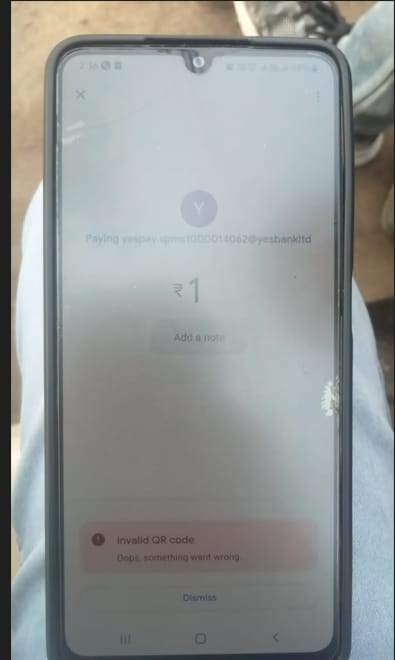
Question 12:- 

 IMG_257

Solution :- Sir, this is an error which comes while paying through G pay.we are working on this error and as of now you will not be able to do this transaction. Please wait for a week and we are following for resolution.

Note :- SMA ka Sound box main voice nhi aa rahi hai :-

SMA se kuchh pre-check karen 

Please follow the steps below 

1. Spice money app

2. Go to the “more” option

3. Then click “Voice alert option”

4. Check all the services options enabled or not

Agar fir bhi SMA ko issue hai to niche diya gaya process follow karna hai

1. SMA ko sounbox Address ( ) par bhejna hai jiske baad soundbox replacement hoga |

Agar koi SMA call karta hai or puchta hai customer ke account se amount deduct ho gya hai par mere pass receive nhi hua or na hi uske account mai return gya hai,  to us SMA ko bolenge ki bank ke niyam anusar UPI ka amount T+3 working days mai same account me jata hai.