

Self-Forgot ID process through Spice Money App
Pre-checks: – SMA ki registered mobile number sim usi phone me honi chahiye jis phone me SMA forgot id kar rahe hai.
Steps: –
- SMA needs to update the spice money application from play store.
- Open “Spice Money-App”.
- Need to click on the “Forgot ID?” Option.
- Enter the mobile number (Spice Money me registered mobile number)
- Enter the “Pan card number” & “DOB”.
- Then click on the “Verify” option.
- SMA ke registered number par ek OTP aayega or OTP SMA ke phone me auto read hoga.
- Process complete hone ke baad SMA ke registered number pas SMA ID share same time par share ho jayegi
Process Through Screen Shot: –
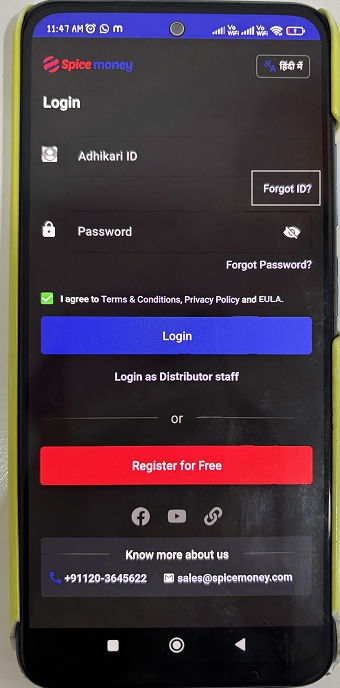
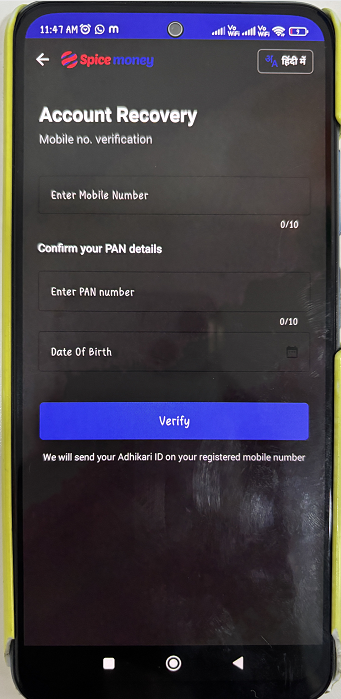
> Check the status in Alliance partner list (Hyperlink), in case SMA ID found in list then ask SMA to connect with distributor as well as he can connect to Alliance partner helpline which he received earlier, if he doesn’t know his distributor or alliance partner spoc then will suggest SMA to take another id of spicemoney from other family members proof and do the business